Why integrate your Magento e-commerce with MDirector?
Generate effective Email Marketing and SMS campaigns, synchronizing in real-time your database in MDirector from the information stored in Magento. With the information of your customer groups, you can perform targeted and segmented email marketing actions.
The “Magento Extension” module for newsletter & email marketing in MDirector allows communication between platforms to save time and take advantage of sales opportunities.
Thanks to its tracking pixel, you will be able to get the information about your Magento e-commerce customers’ purchases and view it in the MDirector statistics panel.
In your Magento dashboard, you will be able to identify the traffic coming from MDirector from a specific email marketing campaign you have run.
Features
Welcome email to new contacts from MDirector.
From now on, you can choose to send a welcome email through MDirector to all users who subscribe through the form of your online store.
Synchronization of unsubscribes from MDirector to Magento.
With an automatic process, once a day the unsubscribes are synchronized, and you keep both systems updated.
Advanced reporting.
Measure your sales goals (number of products sold, total amount of sales, and product ID) of each of your shipments, just by activating the sales pixel in the module.
Installation and Recommendations
Recommendations for the correct installation of the extension
Download the MDirector plugin for Magento in previous versions.
Fill in your data in the form and download the plugin for free.
Compatible with versions 1.8x and 1.9x of Magento CE.
Compatible with versions 1.11x, 1.12x, 1.13x and 1.14x of Magento EE.
Following Magento’s guidelines, we recommend making a BACKUP OF THE FILES AND THE DATABASE before any new extension.
Installation
Once you have a compressed file of the extension e.g. zip, you must decompress the file, and inside you will find 2 files:
app
js
In case you have compilation activated, please disable it before proceeding with the installation.
Now you will need to access the directory where your Magento has been installed and copy the 2 folders in it.
In case you have cache activated, you should clean it now. To be able to do that, go to system → cache manager and click on Flush Magento Cache.
MDirector Account creation
To be able to use the Magento extension, it is necessary to have a created account in MDirector. The credentials to run the extension are obtained with a MD PRO O MD TOTAL account.
So, there are 3 possible cases:
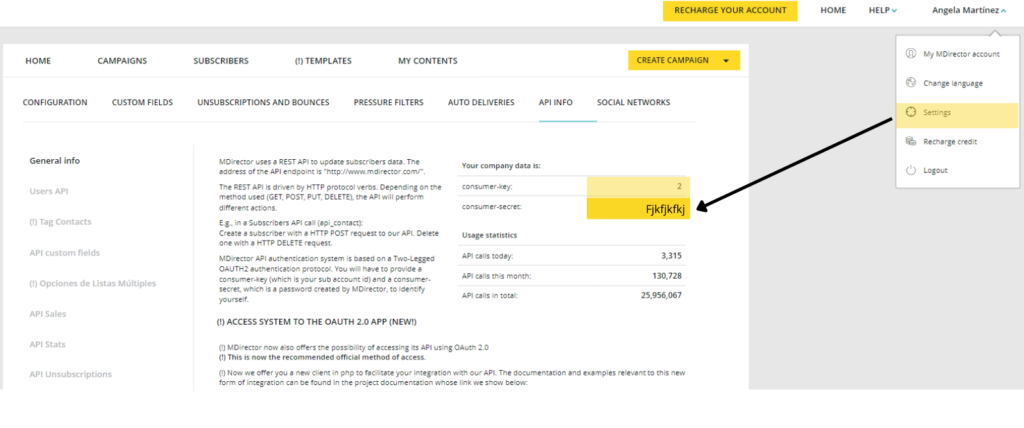
You already have a MD PRO or MD TOTAL MDirector account: In that case, you only need to request access to the API, as shown in the picture below.
You have a MD FREE account: Likewise, you just need to update the type of your account to MD PRO o MD TOTAL and follow the previous step.
You don’t have a MDirector account: In this case, you need to create an account from MDirector.com. Furthermore, you will register with a MD FREE account and then follow the steps in the previous points, 1 and 2.
Configuration of the extension
To set up this module, you should go to:
System → Configuration → Interactiv4 → MDirector
These are the fields you will find:
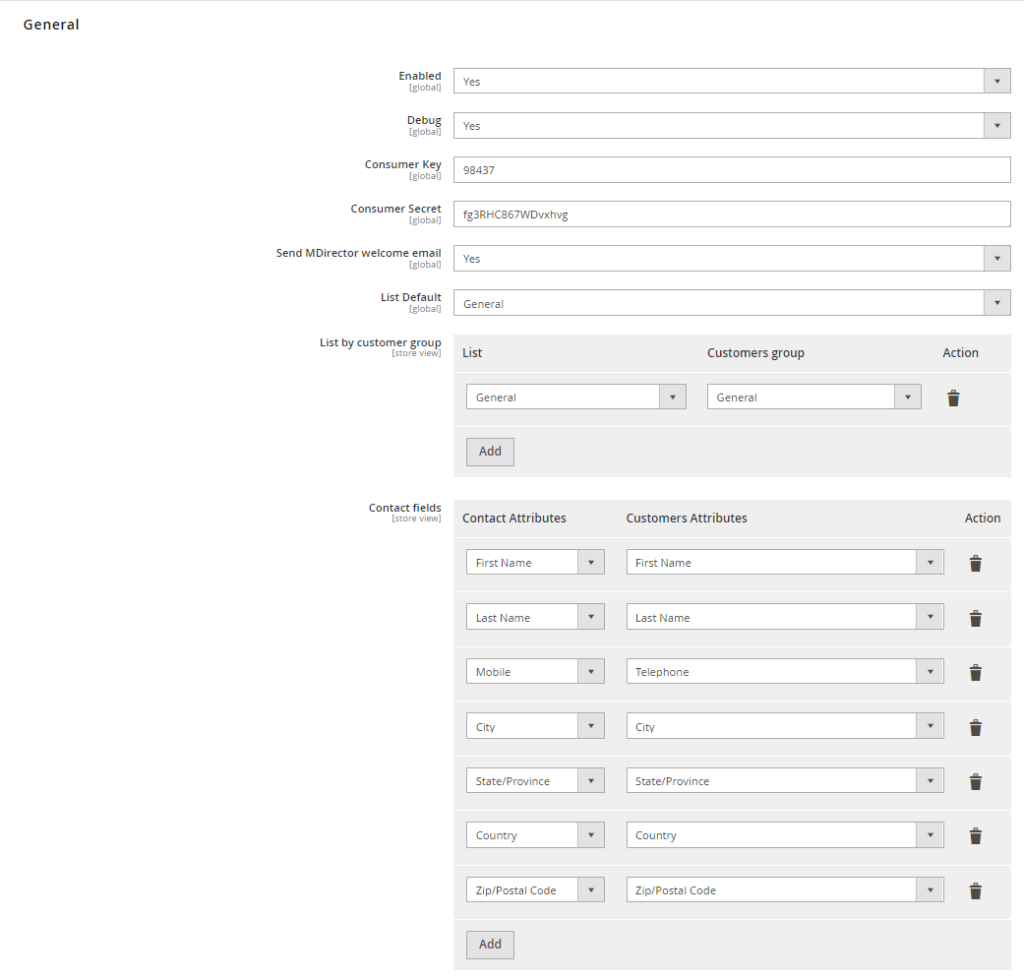
General
Enabled: Allows to activate and disable the extension.
Consumer key: Indicated the necessary key to connect with MDirector (Provided at MDirector administration panel).
Consumer secret: Indicates the secret number needed to connect with MDirector (Provided at MDirector administration panel).
Default list: Indicates the default list in which the extension will store the clients’ information if it is not assigned to a group of clients.
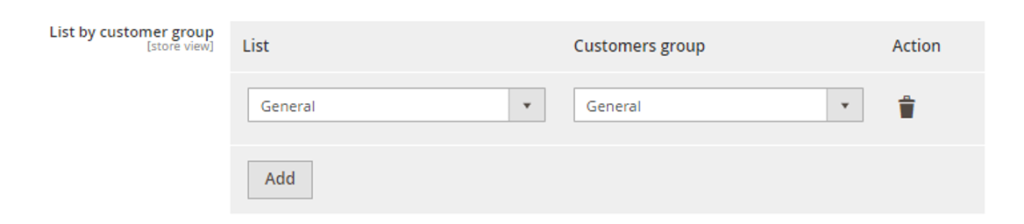
List by a group of customers: This allows to assign the lists in MDirector with a group of clients in Magento.
Subscriber fields: Allows relating the subscriber fields of MDirector database to the subscriber fields of clients in Magento. To add a new relation, select “Add Attribute” and select the fields you want to relate.
Pixel for sales follow-up
A follow-up pixel is an invisible image that allows the compiling of information about the purchase of each customer.
Enabled: To activate and disable the insertion of the follow-up pixel.
Parameter to identify MDirector traffic: Parameter name to identify the traffic in its later analysis (by default: utm_source=mdirector)
After making the necessary changes, do not forget to save the configuration (superior left corner)
Creation of a group of clients’ lists
To assign a group of clients to a list, you need to click on “Add List”. It will appear a new row in which you have to select the list that you want to the groups of clients to be assigned and Magento’s clients. If you wish to use a different group of clients than the pre-established, you need to create it previously in Customers → Customers group
After making the necessary changes, do not forget to save the configuration (superior right corner)
Guide of the main common errors
Report errors
If you have to report any error or incidence, add screenshots, logs, or what you consider necessary to be able to solve it. The logs can be found at /var/log and can be activated at:
System → Configuration → Developer → Logs configuration
Sign up and start using MDirector for free. Create your first Email Marketing campaigns: enjoy up to 5.000 sendings each month and manage up to 5.000 contacts. Design in Landing Optimizer your first landing page and generate up to 1,000 visits. No credit card is required.